
Technology is part of everyday life. We use computers, phones, apps, and the internet for work, school, and entertainment. While using these tools, you often see short forms like CPU, RAM, Wi-Fi, USB, and VPN. These abbreviations make communication faster, but they can confuse beginners. Learning their meanings helps you understand devices, software, and online services with less effort. It also makes reading guides and technical information much easier.
If you have ever asked what does it stand for in tech, you are not alone. Many people want simple answers without difficult words. This guide explains common technology abbreviations in clear language. Each term includes an easy meaning and useful examples. You will quickly learn the words used in computers, networking, programming, cloud services, and mobile technology. By the end, you will feel more confident using modern technology every day.
Why Knowing What IT Abbreviations Stand For Matters in Tech
Technology professionals use abbreviations because they make communication faster and more efficient. Students, office workers, and everyday users also benefit from learning these short forms. Knowing terms correctly reduces mistakes while using software, troubleshooting devices, or reading technical documents during daily work or study.
For example, understanding CPU, RAM, and SSD helps when buying a computer. Knowing VPN improves online privacy, while HTTP explains how websites load. Similar to searching what does wyf mean in text, learning technology abbreviations helps you understand modern communication without feeling lost or confused.
What These Technology Abbreviations Stand For in Daily Life
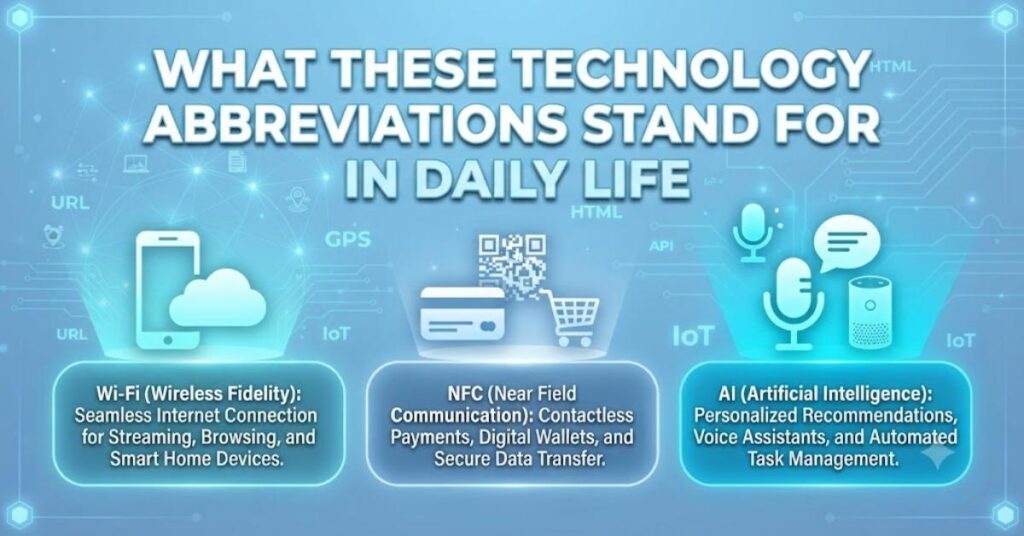
Technology abbreviations are part of everyday life. You see them while sending emails, using smartphones, browsing websites, or connecting devices. Even people without technical jobs regularly encounter these terms. Learning their meanings helps you use digital tools correctly and solve simple problems independently.
For example, Wi-Fi connects your phone to the internet, Bluetooth links wireless headphones, and USB transfers files between devices. Just as people ask what does wyf mean in text, they also search for simple explanations of common technology abbreviations used every day.
Internet and Web Terms
Internet abbreviations describe how websites and online services work. Terms like HTTP, HTTPS, URL, and DNS help computers communicate across the web. You may not notice them often, but they work behind every website you visit or online service you use daily.
| Abbreviation | Meaning | Example |
| URL | Uniform Resource Locator | Website address |
| HTTP | HyperText Transfer Protocol | Loads web pages |
| HTTPS | Secure HTTP | Safe website connection |
| DNS | Domain Name System | Finds website addresses |
What CC, BCC, and SMTP Stand For in Communication
Email services use several abbreviations to organize messages. CC means Carbon Copy and shares emails with additional recipients. BCC means Blind Carbon Copy, hiding recipient names. SMTP stands for Simple Mail Transfer Protocol, which sends emails between servers across the internet.
For example, use CC when informing coworkers about a project. Use BCC when sending newsletters privately. SMTP works behind the scenes every time you send an email. Learning these terms makes email communication easier and more professional for everyone.
Technology & IT Abbreviations in Computer Hardware
Hardware abbreviations describe physical computer components. These include CPU, GPU, RAM, SSD, HDD, and USB. Understanding these terms helps when upgrading computers, comparing products, or solving performance issues. Even beginners can quickly recognize these common abbreviations with regular use.
A computer with more RAM runs multiple programs smoothly. An SSD starts the operating system much faster than an HDD. USB connects printers, keyboards, and storage devices. Learning hardware abbreviations helps you make smarter purchasing decisions and better understand computer specifications.
Input and Output Devices
Input devices send information into a computer, while output devices display results. Common examples include keyboards, mice, scanners, monitors, speakers, and printers. These devices work together to help users interact with computers during everyday activities.
Examples of input devices
- Keyboard
- Mouse
- Scanner
- Microphone
Examples of output devices
- Monitor
- Printer
- Speaker
- Projector
Technology & IT Abbreviations in Software
Software abbreviations describe programs, applications, and operating systems. Terms like OS, GUI, EXE, APK, and PDF appear regularly on computers and smartphones. Understanding these abbreviations makes software installation, file management, and troubleshooting much easier for every user.
For example, APK files install Android applications, while EXE files install Windows software. PDF documents preserve formatting across different devices. Learning software abbreviations reduces confusion when downloading files or following software installation instructions.
Operating System Terms
An operating system manages computer hardware and software resources. Common operating systems include Windows, macOS, Linux, Android, and iOS. They control applications, memory, storage, and user interactions, making computers and mobile devices work properly every day.
For example, Windows powers many personal computers, while Android runs millions of smartphones worldwide. Linux is popular on servers because of its flexibility and reliability. Learning operating system terms helps users understand device functions and software compatibility.
File Types and Formats
Files come in different formats depending on their purpose. Documents, images, videos, and audio files all use different extensions. Recognizing these formats helps you choose the correct software to open or edit each file.
| File Type | Purpose |
| Documents | |
| JPG | Images |
| PNG | Graphics |
| MP4 | Videos |
| MP3 | Audio |
Technology & IT Abbreviations in Networking
Networking abbreviations explain how devices connect and exchange information. Common terms include LAN, WAN, VPN, IP, DNS, and MAC. These abbreviations appear in home networks, office environments, and internet settings every day.
Understanding networking terms helps troubleshoot internet problems and improve connections. Whether setting up Wi-Fi or securing remote work, these abbreviations simplify technical discussions. Similar to understanding what does wyf mean in text, networking knowledge improves digital communication skills.
What LAN, WAN, and VPN Stand For in Networking
LAN stands for Local Area Network and connects nearby devices. WAN means Wide Area Network and connects locations over long distances. VPN stands for Virtual Private Network and protects internet traffic through encrypted connections.
For example, your home Wi-Fi is usually a LAN. The internet itself is a WAN connecting millions of networks. A VPN protects personal information while using public Wi-Fi at airports, hotels, or coffee shops.
Security Terms
Security abbreviations protect computers, accounts, and personal information. Common examples include MFA, OTP, SSL, TLS, and AES. These technologies help prevent unauthorized access and secure sensitive data during online activities.
Always enable MFA on important accounts because it adds another security layer. SSL and TLS encrypt website connections to keep information private. Learning these abbreviations helps users browse the internet more safely and confidently.
Technology & IT Abbreviations in Cloud Computing
Cloud computing allows users to access storage, software, and computing resources online instead of using local hardware. Common abbreviations include SaaS, PaaS, IaaS, API, CDN, and SLA. These services support businesses and individuals worldwide.
For example, cloud storage lets you save files online and access them anywhere. Businesses use cloud platforms to reduce hardware costs and improve flexibility. Understanding cloud abbreviations helps users choose suitable online services for different needs.
Cloud Service Models
Cloud providers offer different service models depending on customer needs. SaaS delivers ready-to-use software, PaaS provides development platforms, and IaaS offers virtual servers and infrastructure for businesses and developers.
| Model | Meaning |
| SaaS | Software as a Service |
| PaaS | Platform as a Service |
| IaaS | Infrastructure as a Service |
What API, CDN, and SLA Stand For in Cloud Computing
API stands for Application Programming Interface and allows software to communicate. CDN means Content Delivery Network and speeds up website loading. SLA stands for Service Level Agreement and defines expected service quality between providers and customers.
For example, APIs connect payment systems with shopping websites. CDNs deliver website content faster worldwide. SLAs explain uptime guarantees and customer support commitments before businesses purchase cloud services from providers.
Technology & IT Abbreviations in Programming
Programming abbreviations simplify software development and coding discussions. Developers frequently use HTML, CSS, JS, SQL, IDE, SDK, and Git. Learning these terms helps beginners understand coding tutorials and technical documentation more easily.
For example, HTML builds webpage structure while CSS controls appearance. JavaScript adds interactive features, and SQL manages databases. Understanding these abbreviations creates a strong foundation for learning programming and web development.
What HTML, CSS, JS, and SQL Stand For in Programming
HTML stands for HyperText Markup Language. CSS means Cascading Style Sheets. JS represents JavaScript, while SQL means Structured Query Language. Together, they build, style, and manage modern websites and applications.
A webpage starts with HTML structure, CSS improves design, JavaScript adds animations, and SQL stores user information in databases. These technologies work together to create responsive, interactive websites people use every day.
Development Tools
Developers use different tools to write, test, and manage software projects efficiently. Popular tools include IDEs, code editors, Git, GitHub, debuggers, and package managers. These tools improve productivity and reduce programming mistakes.
For example, Visual Studio Code helps developers write code quickly, while Git tracks project changes. GitHub stores code online and supports teamwork. Learning development tools makes software creation more organized and efficient.
Technology & IT Abbreviations in Business Tech
Business technology uses abbreviations to improve communication and productivity. Common examples include CRM, ERP, HRMS, KPI, and BI. These systems help companies manage customers, employees, sales, and business performance effectively.
For example, CRM software stores customer information, while ERP manages company resources. KPIs measure business success using specific goals. Learning these abbreviations improves workplace communication and helps employees understand modern business systems.
Office and Company Terms
Office technology includes abbreviations used in meetings, documents, and company operations. Terms such as KPI, HR, CRM, and ERP appear regularly in professional workplaces across many industries.
Employees often review KPIs during meetings to measure performance. HR handles recruitment and employee support. CRM improves customer relationships, while ERP connects different business departments using one integrated software system.
Marketing Technology
Marketing teams use technology abbreviations to measure campaign performance and customer engagement. Common examples include SEO, PPC, CTR, ROI, and CMS. These abbreviations appear in digital marketing reports and advertising strategies.
SEO improves website visibility in search engines. PPC manages paid advertisements, while ROI measures profits from campaigns. Understanding marketing abbreviations helps businesses create successful online marketing strategies and evaluate performance accurately.
Technology & IT Abbreviations in Mobile Technology
Mobile technology abbreviations describe wireless communication, smartphones, and mobile applications. Common terms include LTE, 5G, SMS, MMS, NFC, GPS, and VoLTE. These abbreviations appear in phone settings and service plans regularly.
Learning these abbreviations helps users choose better mobile plans and understand smartphone features. Similar to learning what does wyf mean in text, understanding mobile technology terms makes digital communication much easier for everyone.
What LTE, 5G, and SMS Stand For in Mobile Tech
LTE means Long-Term Evolution and provides fast mobile internet. 5G represents the fifth generation of wireless technology with higher speeds. SMS stands for Short Message Service and allows users to send text messages.
For example, 5G supports smoother video streaming and online gaming. LTE remains widely available for reliable internet access. SMS continues to work even without internet, making it useful for basic communication.
App Terms
Mobile apps use several abbreviations during installation and updates. Common terms include APK, IPA, UI, UX, and OTA. These abbreviations describe applications, user experience, and software updates on smartphones.
A good UI makes navigation simple, while UX focuses on user satisfaction. OTA updates install new software wirelessly without connecting devices to computers. Learning these app terms improves smartphone knowledge and confidence.
Technology & IT Abbreviations – Trusted Learning
Learning technology abbreviations gradually makes technical information much easier to understand. Start with common terms you see every day, then continue exploring advanced concepts. Regular practice helps you remember abbreviations naturally during daily computer and internet use.
Reliable learning sources include official technology websites, educational platforms, and product documentation. Reading guides and practicing with real devices builds confidence. Whether learning networking or searching what does wyf mean in text, consistent learning improves your digital skills.
Conclusion
Technology abbreviations are everywhere, from smartphones and computers to cloud services and programming. Understanding these short forms helps you communicate better, solve simple technical issues, and make smarter technology decisions in everyday life with greater confidence.
Keep learning new abbreviations as technology evolves because new terms appear regularly. Practice using them during work, school, and personal projects. Small improvements each day will build strong technical knowledge over time.
FAQs
What does IT stand for in tech?
In technology, what does it stand for in tech means Information Technology, which includes computers, software, networks, and digital systems.
Information Technology helps people manage data, communicate faster, solve technical problems, and support businesses using modern digital tools every day.
Why is it important to know what does IT stand for in tech?
Knowing what does it stand for in tech helps you understand technology discussions, technical documents, and workplace communication more easily.
It also improves your confidence when using computers, software, online services, and learning new digital skills for school or work.
What does CPU stand for in tech?
CPU stands for Central Processing Unit, the main part that processes instructions and controls computer operations. What does it stand for in tech is a common learning topic.
A faster CPU improves computer performance, helps programs run smoothly, and supports multitasking during everyday computing activities.
What does RAM stand for in tech?
RAM means Random Access Memory, which temporarily stores data while your computer is running. What does it stand for in tech often includes learning memory terms.
More RAM allows your device to open multiple applications, switch tasks quickly, and improve overall system speed and performance.
What does VPN stand for in tech?
VPN stands for Virtual Private Network and creates a secure internet connection. Learning what does it stand for in tech helps users browse more safely online.
A VPN protects personal information, hides your IP address, and secures data when using public Wi-Fi networks.
What does LAN stand for in tech?
LAN means Local Area Network, which connects computers and devices within one location. What does it stand for in tech includes many networking abbreviations like this.
Homes, schools, and offices commonly use LAN connections to share files, printers, and internet access between multiple devices.
What does API stand for in tech?
API stands for Application Programming Interface and allows different software programs to communicate. Understanding what does it stand for in tech makes software concepts easier.
Developers use APIs to connect applications, share data, and add useful features without creating everything from the beginning.
What does HTML stand for in tech?
HTML means HyperText Markup Language and builds the structure of web pages. What does it stand for in tech is one of the first programming concepts beginners learn.
HTML works with CSS and JavaScript to create websites that display text, images, videos, and interactive content properly.
What does 5G stand for in tech?
5G stands for the fifth generation of mobile network technology. Learning what does it stand for in tech helps users understand faster wireless communication.
It provides higher internet speeds, lower delays, better streaming quality, and stronger support for modern mobile applications and devices.
Where can I learn what does it stand for in tech?
You can learn what does it stand for in tech through trusted technology websites, online courses, educational blogs, and official product documentation.
Regular reading and practicing common abbreviations will improve your technical knowledge and help you understand digital technology with confidence.

Harry Collins is a passionate content writer at OkyTechy who specializes in explaining word meanings, internet slang, abbreviations, and digital terminology. He focuses on creating clear, informative, and reader friendly articles that help audiences better understand modern language and online communication.